

I often encounter feedback from users who use analysts when receiving market quotes.,Some GEM stocks are not available,Summarized by other users’ solutions and repeatedly verified by users,The following methods have been found to be quite effective:
1、Close and exit your analyst software first。
2、Download the analyst's code table file from the download file location above
3、Copy the decompressed file STKINFO51.DAT to the analyst’s Shenzhen Stock Exchange data directory,Replace files with the same name,As shown below:
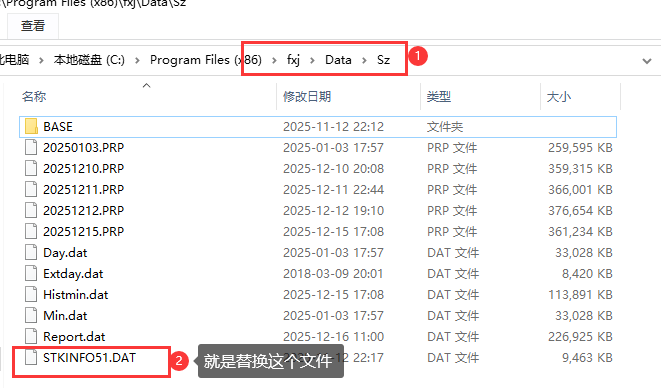
4、Now start the analyst again and take a look,Can you already see the missing GEM stock code?。Any other questions?,Welcome to leave a message in the comment area。We will help you solve it。
5、If you encounter a missing SSE Science and Technology Innovation Board stock code,Please refer to this article:Analyst Tutorial on how to solve the problem of incomplete stock codes on the Science and Technology Innovation Board
Most of the download resources on this site are collected from the Internet,Only for learning and communication purposes,Copyright belongs to the original author。If you need to use non-free software or services,Please purchase genuine licenses and use them legally。If the content published on this site infringes upon your rights,Please contact the webmaster to delete,We will handle it promptly。
If the download address is invalid,You can leave me a message,The editor saw the news,Will update the link as soon as possible! Thanks!



Trackbacks